How to add the Alors On Danse sound on TikTok, Reels and Shorts
The trend sound is Alors On Danse by Stromae. How to add it on TikTok, Instagram Reels and YouTube Shorts, line up the lunge and avoid a double track.
6 min read · Updated
The sound, in one line
The Alors On Danse trend is posted with “Alors on danse” by Stromae. To add it, open an Alors On Danse trend video, tap the sound name at the bottom and choose Use this sound, or search “Alors on danse Stromae” in the sound picker when you post. If your video already has the song in it, turn its original sound down so the two don’t play over each other.
Every video from the Alors On Danse page already has the song laid over it. Picking the sound when you post still matters, for the reason below.
Why picking the official sound matters
Each sound on TikTok, Reels and Shorts has a page listing the videos that use it. Pick Alors On Danse from the library and your post joins that page, next to everyone else’s keyboard-and-hype clip. A video with the song only baked in shows up as “original sound” and misses it.
- People browsing the sound can find your video.
- The sound name tells viewers which trend it is at a glance.
- If the baked-in audio is ever muted, the library sound still plays.
Several versions of the song can turn up in a search, including remixes, sped-up edits and uploads labeled “original sound”. The safest pick is the one you find by tapping the sound on a trend video you like, because that is the page the trend lives on.
TikTok
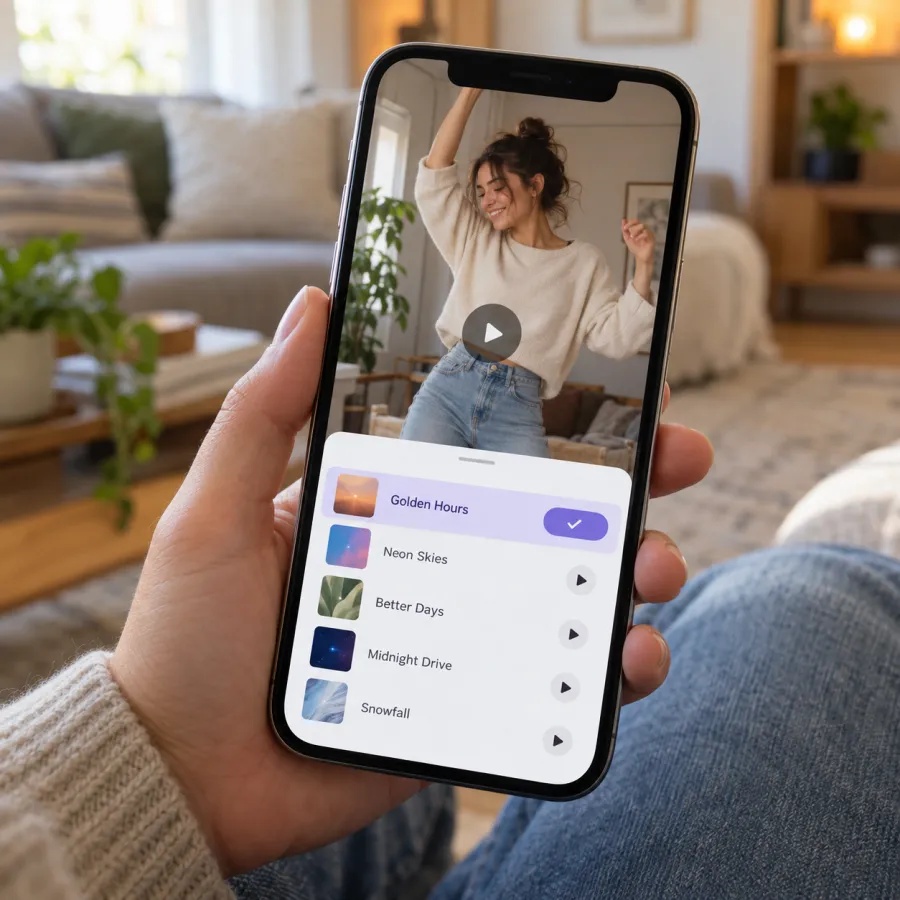
From a trend video
- Find an Alors On Danse video in your feed, or search “alors on danse trend”.
- Tap the sound name at the bottom and check it reads Alors on danse by Stromae.
- Tap Use this sound, then Upload, and pick your video.
- Lower the original sound in the volume settings (see below), then post.
While posting
- Start a new post and upload your video.
- Tap Add sound, search “Alors on danse Stromae”, and pick it.
- Open the volume settings and lower the original sound.
Instagram Reels
- From an Alors On Danse Reel: tap the audio name at the bottom, then Use audio, and add your video.
- Or start a new Reel, add your video, tap the music icon (Add audio) and search “Alors on danse”.
- Lower the original audio so only one copy of the song plays.
YouTube Shorts
- From an Alors On Danse Short: tap the sound name, then use this sound in a new Short.
- Or while making a Short, tap Add sound and search “Alors on danse”.
- Lower the original audio if your video already has the song.
The clip is widescreen, so it plays with bars above and below on Shorts. Keep it that way: the dance at the end needs the width.
Mixing: avoid a double track
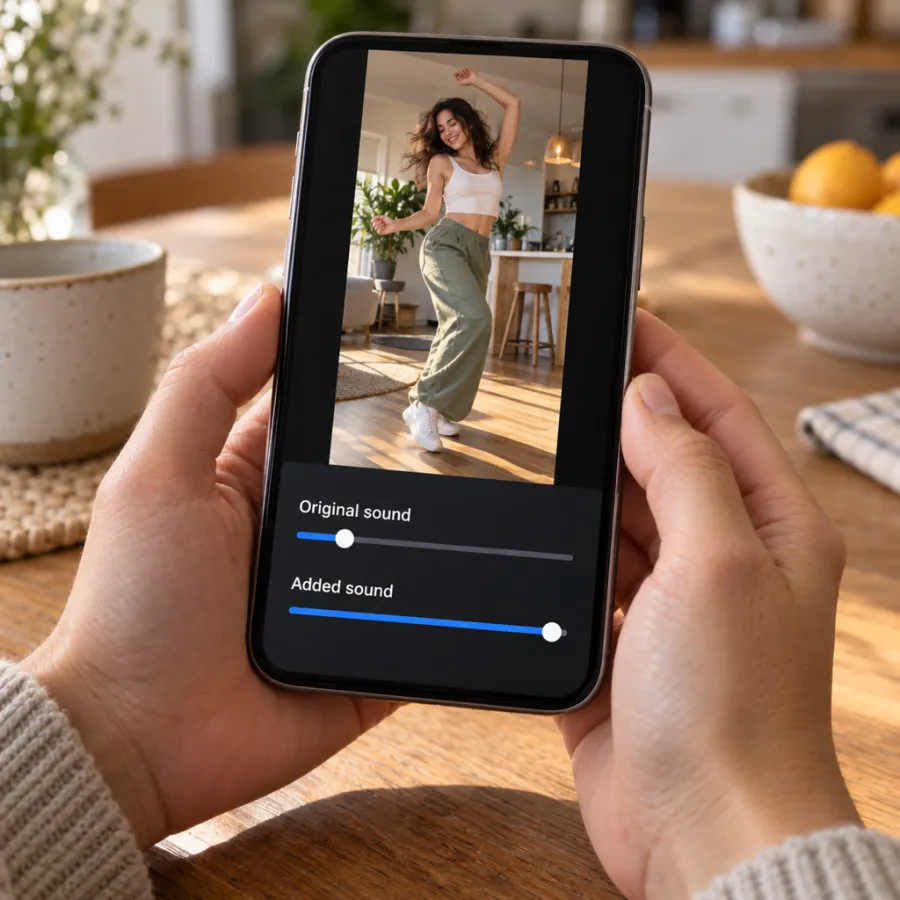
Our MP4 contains the Alors On Danse song over the whole video. The library sound starts at its own point, so two copies at full volume sound like an echo. Pick one:
| Setting | Original sound | Added sound |
|---|---|---|
| Library sound leads | Off or very low | Full |
| Our timing leads | Full | Very low, just to show the name |
The second setting keeps our timing and still puts the song’s name on your post. A video made with a prompt or filmed at home probably has no song, so add the library sound at full volume.
Line the lunge up with the music
The moment everyone waits for is the hype lunging into the lens. It lands best on a strong beat, so it feels like the song pushed them forward.
- A video from the Alors On Danse page: keep the original sound up and the added sound low, and the timing stays as made.
- A filmed or prompted video: when you add the sound, most apps let you choose where it starts. Drag it until a strong beat lands on the lunge, then play it through once.
- If the dance at the end runs past the part of the song you picked, trim the start of the video, not the dance.
If the sound is muted or missing
- Business accounts on TikTok and Instagram often can’t use many popular songs. Switch to a personal or creator account, or post with the baked-in song.
- A sound can be unavailable in some regions. Open it from someone else’s trend video instead of searching.
- If search finds nothing, update the app.
- If an app mutes the song in your upload, pick the Alors On Danse sound from its library when you post, and turn the original down.
If a video you already posted was muted, save your original file, start a new post with it, add the sound from the library this time, and post it again.
The AI label
When you post an AI-made Alors On Danse video on TikTok, turn on the AI-generated content label in the post settings; other apps have similar labels.
Wondering what the song says? See Alors On Danse meaning and lyrics translation, or make your own clip on the Alors On Danse page. NowStarring is an independent fan tool, not linked to the song’s artist or the original TV sketch. The song belongs to its rights holders.
Questions
What sound is the Alors On Danse trend?
“Alors on danse” by the Belgian artist Stromae. Search it in the app’s sound picker, or tap the sound on a trend video.
Why is the song playing twice in my video?
The video already has the song and you added the library sound on top. Turn the original sound off, or the added sound down to almost nothing.
Does the NowStarring Alors On Danse video already have the song?
Yes. The song plays over the whole video, with no watermark. Picking the sound when you post links your video to the trend’s sound page.
Why can’t I find Alors On Danse on TikTok?
Business accounts can’t use many songs, and some sounds aren’t available everywhere. Open the sound from another trend video, switch to a personal account, or update the app.
Can I use the Alors On Danse sound on YouTube Shorts?
Yes. Tap the sound on a trend Short and use it, or add it while making a Short.
Which version of Alors On Danse should I pick?
The one the trend videos use. Tap the sound on a trend video you like and use it from there, rather than picking a remix from search.
Do I need to label my video as AI?
If it’s AI-made, turn on the AI-generated content label on TikTok, or the matching label on other apps.